How tier progression works, what drives your order count, and practical ways to advance through the LinkPandaVIP programme.
The Tier Thresholds
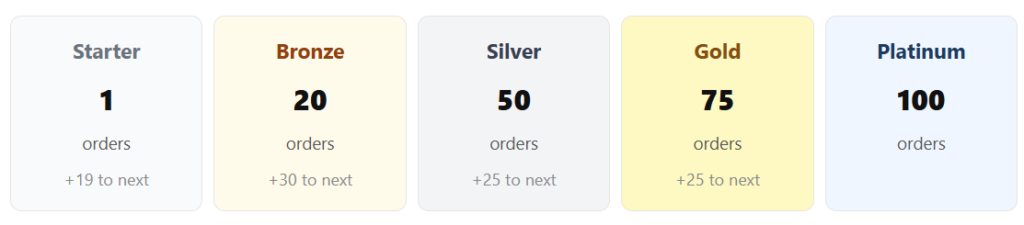
Each tier requires a cumulative number of link orders placed within the rolling 365-day window. Here is a recap of the thresholds:
What Counts as an Order
Every link building order you place through the app contributes to your order count, regardless of the placement type. This includes Link Insertions, Guest Posts, Brand Mentions, Listicles, and Citations, whether placed as individual orders or as part of a batch submission. Each order number (for example Order #004655) counts as one order, even if that order contains multiple link rows within it.
How to Check Your Progress
Click LinkPandaVIP in the left sidebar at any time to see your current status. The VIP page shows your total link orders in the last 365 days, your current tier, and a progress bar across all five milestones. The bar makes it easy to see exactly how many orders stand between you and the next tier.
Practical Ways to Move Up Faster
Place batch orders rather than single links
When you have multiple placements in mind, submit them together using the Add to Order button across several sites in the Buy Again tab before clicking Order Now. This batches them into a single order submission. You can also use the Number of placements required field in the Order Now form to request multiple links at once. Each submitted order number contributes to your total count.
Use the Buy Again tab for quick repeat orders
The Buy Again tab in My Orders lists all the referring domains you have previously ordered from, with Order Now and Add to Order buttons ready for each. Returning to sites that performed well is a fast way to place orders without needing to go through the full new site request process.
Use Services packages for volume orders
The Services page offers packages of 5x, 7x, and 10x links in a single order. Enquiring about a package is an efficient way to increase your order volume in one go, while also benefiting from the consistent quality and structure of a packaged service. As you approach the next tier threshold, ask your account manager whether a package submission would help you reach it.
Maintain activity throughout the year
Because the VIP programme uses a rolling 365-day window, consistent ordering across the year is more effective than placing a large volume of orders at once and then going quiet. Spreading your orders out ensures your count stays healthy and reduces the risk of older orders dropping off faster than new ones come in.
When Does Your Tier Update?
Tier upgrades are automatic. As soon as your order count within the last 365 days reaches the next threshold, your account tier updates and you immediately gain access to that tier’s discount on orders of 4 or more links. There is no manual process or waiting period.
In the same way, if your active order count drops below a tier’s threshold due to orders falling outside the 365-day window, your tier will adjust downward accordingly. The VIP page always reflects your current live status.
Need Help?
If you have questions about your VIP progress or want advice on reaching the next tier, your account manager is your first point of contact. Their email is shown at the top of your LinkCard.
General support: info@linkpanda.com
Contact: linkpanda.com/contact