
A guide to the LinkPanda VIP programme, how tiers are calculated, what discounts you unlock at each level, and how your order history influences the service recommendations you receive.
How to Access Your VIP Status
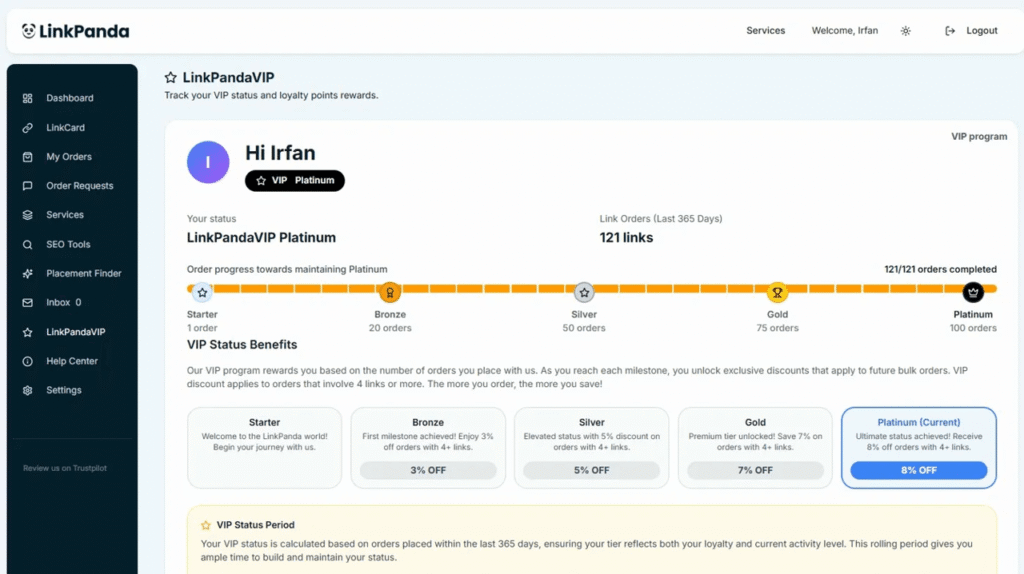
Click LinkPandaVIP in the left sidebar to open your VIP dashboard. The page shows your current tier, your first name and VIP badge, the total number of link orders placed in the last 365 days, and a progress bar showing exactly how far you are towards the next tier milestone.
The Five VIP Tiers
There are five tiers in the LinkPandaVIP programme. Each tier is reached by accumulating a set number of link orders placed within the last 365 days. VIP discounts apply to orders that include 4 or more links.
Starter
1 Order
Welcome to LinkPanda. Begin your journey with full access to the standard inventory and account management.
Bronze
20 Orders
First milestone achieved. Enjoy 3% off on orders with 4 or more links.
Silver
50 Orders
Elevated status. Save 5% on orders with 4 or more links.
Gold
75 Orders
Premium tier unlocked. Save 7% on orders with 4 or more links.
Platinum
100 Orders
Ultimate status achieved. Receive 8% off on orders with 4 or more links.
Tracking Your Progress
The VIP dashboard shows a horizontal progress bar spanning all five tiers from Starter to Platinum. Each milestone is marked with an icon and the required order count. The bar fills from left to right as your order count grows, giving you a clear visual of where you stand and how many orders remain until your next tier.
Your current order count toward your active tier is shown above the progress bar, for example 121/121 orders completed for a Platinum member. The total link orders placed in the last 365 days is also shown prominently at the top of your VIP page.
VIP Status Period
The VIP dashboard shows a horizontal progress bar spanning all five tiers from Starter to Platinum. Each milestone is marked with an icon and the required order count. The bar fills from left to right as your order count grows, giving you a clear visual of where you stand and how many orders remain until your next tier.
Your current order count toward your active tier is shown above the progress bar, for example 121/121 orders completed for a Platinum member. The total link orders placed in the last 365 days is also shown prominently at the top of your VIP page.
Rolling 365-day window: Your VIP status is calculated based on orders placed within the last 365 days only. This ensures your tier reflects both your loyalty and your current activity level.
Orders older than 365 days no longer count toward your tier balance. If your active order count falls below a tier’s requirement, your status will adjust accordingly. Staying active protects and advances your VIP benefits.
How Your Order History Influences Service Recommendations
Beyond the discount tiers, your order track record plays an important role in the way the LinkPanda team works with you. When your account manager proposes services, packages, or placement options, they take into account the history of orders on your account, including the types of links you have built, the domains you have targeted, the DR tiers you have used, and the volume and frequency of your orders.
This means that longer-standing clients with a substantial order history will receive more tailored and relevant service recommendations than a brand new account. Your track record informs the team’s understanding of your niche, your link building strategy, and the kinds of placements that have worked well for you, enabling more precise suggestions and a more efficient ordering process over time.
Need Help?
If you have questions about your VIP status or how discounts are applied, your account manager is your first point of contact. Their email is shown at the top of your LinkCard.
General support: info@linkpanda.com
Contact: linkpanda.com/contact