
A clear explanation of the two ways to purchase link building through the LinkPanda App, and how service requests differ from order requests.
Services
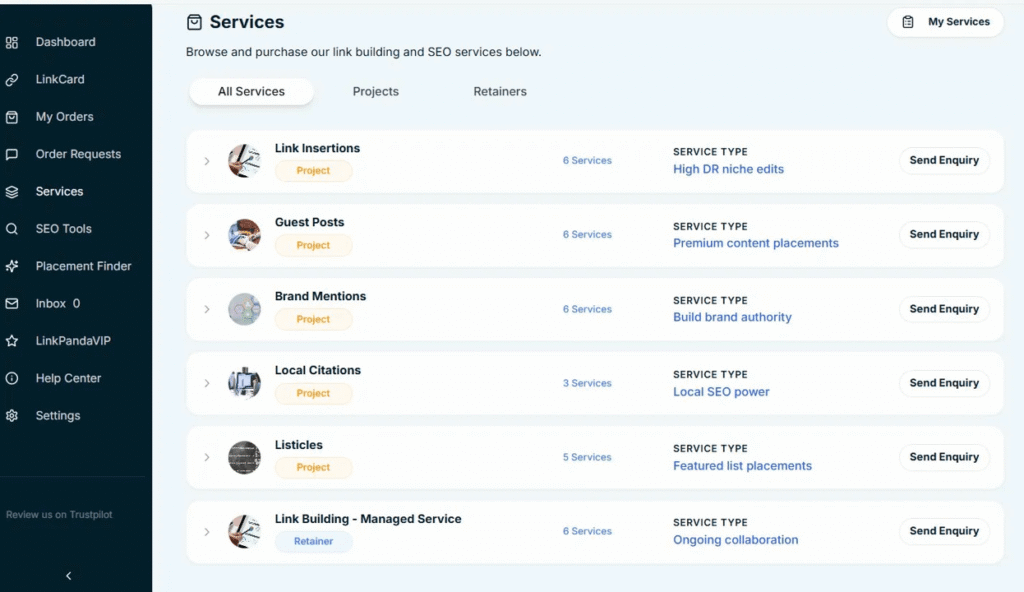
The Services page (accessible from the sidebar or the header menu) is where LinkPanda’s packaged link building products are listed. Services come in two types:
Project
One-time bundles with a fixed number of links and a set price per link. For example, a 5x High DR Link Insertion Service (DR50+) or a 10x Guest Post package. You choose the category, select a package, and click Send Enquiry. The LinkPanda team reviews your enquiry and follows up via your account email to confirm details and proceed.
Retainer
Ongoing monthly link building plans where a defined number of links are delivered each month on a recurring basis. For example, the Managed Link Building Core plan delivers 10 links per month at DR50+. Retainers are ideal for brands that want consistent, hands-off link building over time without placing individual orders each month.
Services are enquiry-based. You do not place an order directly from the Services page. Instead, you send an enquiry and the team confirms everything with you before work begins.
Orders
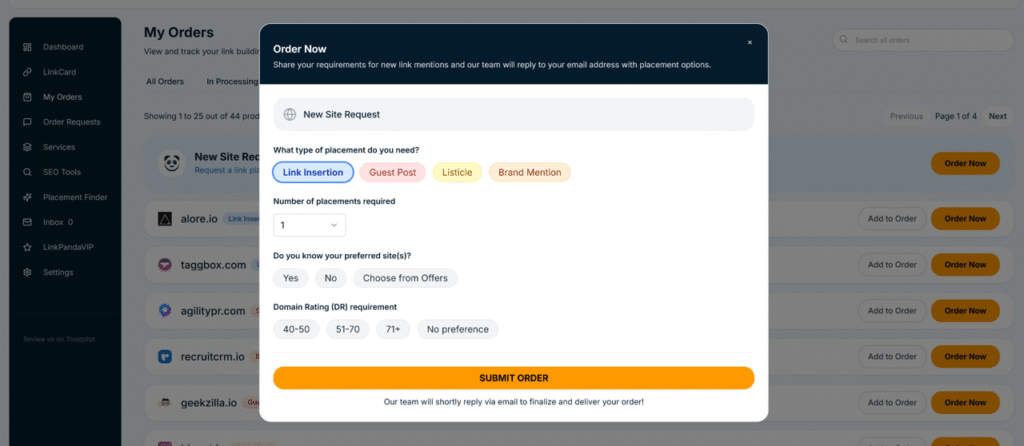
The My Orders page is where you place and track individual link building placements. Each order is a direct submission for one or more specific link placements, which you specify yourself using the Order Now form. You select the placement type (Link Insertion, Guest Post, Listicle, Brand Mentions), choose or request a referring domain, and provide your anchor text and target URL.
Orders are more granular than services. You are in direct control of which sites receive your links, what anchor text is used, and which pages on your website are targeted. Once submitted, orders appear on the Order Requests page and, once accepted by the team, move into active processing and appear in your My Orders list and LinkCard.
Service Requests vs Order Requests
Both routes involve a request stage before work begins, but they are tracked in different parts of the app.
Service Requests
When you click Send Enquiry on a service package, this creates a service request. It is tracked under My Services (accessed via the Services page), in the Requested Services section. Once the team has reviewed and confirmed your enquiry, it moves to Active Services. Once the service period or delivery is complete, it moves to Completed Services.
Service requests are visible in the My Services panel only, not on the Order Requests page.
Order Requests
When you submit an order via the Order Now form, this creates an order request. It is tracked on the Order Requests page (accessible from the sidebar), under the Pending tab until the team reviews it. Once accepted, it moves to the Accepted tab and is then processed as an active order, appearing in My Orders and your LinkCard as links are placed.
Order requests can be for a specific known site (Individual Site Request), an open brief for the team to source a site (New Site Request), or a batch of multiple placements (Bulk Order Request).
Side-by-Side Summary
| Item | Services | Orders |
|---|---|---|
| What it is | A packaged product with a defined scope, quantity, and price. You browse and enquire via the Services page. | An individual link building placement submitted directly via the Order Now form in My Orders. |
| How you access it | Services page in the sidebar or header menu. | My Orders page via the Order Again or Order Now buttons, or the Buy Again tab. |
| How you submit | Click Send Enquiry on a service or package. The team replies to confirm and proceed. | Fill in the Order Now form with placement type, site, anchor, and target URL, then click Submit Order. |
| What it covers | Bundled packages: 5x, 7x, or 10x links. Monthly retainer plans with ongoing delivery. | Individual placements: one link per site request, though multiple can be batched in one order submission. |
| Pricing | Package pricing shown per link or per month. Confirmed by the team after enquiry. | Per-link pricing based on DR tier. Visible before submitting in the order form. |
| Where it is tracked | My Services panel (Active, Requested, Completed). | My Orders page and LinkCard. |
| Request tracking | My Services > Requested Services shows open enquiries awaiting team response. | Order Requests page shows submitted order requests with Pending or Accepted status. |
Which Should You Use?
- Use Services if you want a predefined package with a fixed number of links and a clear scope, or if you want a hands-off monthly retainer where the team manages everything on an ongoing basis.
- Use Orders if you want to place individual placements where you control the specific referring domain, anchor text, and target URL. Orders give you the most direct control over each link in your campaign.
- Both routes are handled by the same LinkPanda team and all placements end up tracked in your LinkCard regardless of how they were initiated.
Need Help?
If you are unsure whether to use Services or Orders for your campaign, your account manager is your first point of contact. Their email is shown at the top of your LinkCard.
General support: info@linkpanda.com
Contact: linkpanda.com/contact