
A guide to understanding the two link statuses in your LinkCard and how they differ from order-level statuses.
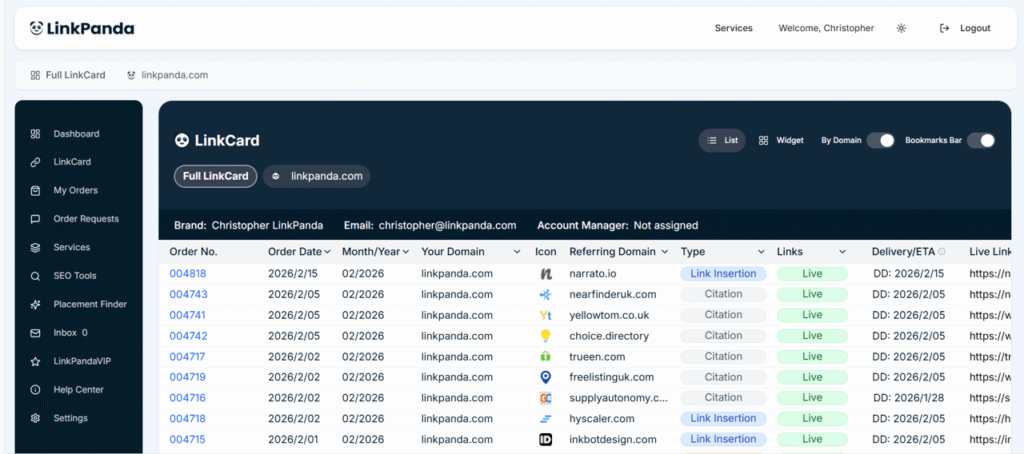
The Two Link Statuses
Processing
A link with a Processing status means the order has been received and the LinkPanda team is actively working on securing and placing the backlink. The link is not yet live on the referring domain.
While a link is processing, the Delivery / ETA column in your LinkCard will show the estimated delivery date in the format ETA: YYYY/M/DD. This gives you an indication of when the link is expected to go live.
You do not need to take any action while a link is in Processing status. The LinkPanda team manages the entire placement process and will update the status automatically once the link is confirmed live.
Live
A link with a Live status means the backlink has been placed and is confirmed live on the referring domain. This is the completed state for any backlink in your portfolio.
Once a link is live, the Delivery / ETA column will update to show the actual delivery date in the format DD: YYYY/M/DD. The Live Link column will display the direct URL to the page where your backlink appears, which you can click to verify the placement in context.
All links built by LinkPanda are intended to be permanent placements on the referring domain.
While a link is processing, the Delivery / ETA column in your LinkCard will show the estimated delivery date in the format ETA: YYYY/M/DD. This gives you an indication of when the link is expected to go live.
You do not need to take any action while a link is in Processing status. The LinkPanda team manages the entire placement process and will update the status automatically once the link is confirmed live.
Link Status vs Order Status
It is important to understand the difference between a link status and an order status, as these are two separate things within the LinkPanda App.
Link Status
Link status applies to an individual backlink and is what you see in the Links column of your LinkCard. It reflects whether that specific link is Processing or Live on its referring domain. A single order can contain multiple links, each with its own independent link status.
Order Status
Order status applies to an entire order and is what you see when you click an Order No. to open the order details side panel. An order progresses through three stages:
- Order Placed: The order has been received and payment confirmed.
- In Progress / Processing: The order is being worked on by the LinkPanda team.
- Delivered: The order has been completed and all links within it have been placed.
Example: An order with Order No. 004599 may contain five individual backlinks. Each of those links has its own link status in the LinkCard. Some may already be Live while others are still Processing, depending on when each placement was completed. The order itself will only reach Delivered status once all links within it have been placed.
Where to See Link Statuses
Link statuses are visible in two places within the app:
- LinkCard (List View): The Links column shows a colour-coded badge for each backlink row, either Processing or Live.
- LinkCard (Widget View): Each expanded widget card shows the link type and follow type badges alongside the current link status.
If you have a question about the status of a specific link or order, your account manager is your first point of contact. Their email address is shown at the top of your LinkCard.
General support: info@linkpanda.com
Contact: linkpanda.com/contact