Why We Run SEO Experiments

Most SEO teams make dozens of changes a year: new titles, rewritten pages, extra internal links, FAQ sections. Very few can say which of those changes actually worked.
At LinkPanda we treat important SEO changes as experiments. We record what changed, when it changed and which pages it touched, then let the data tell us whether it helped.
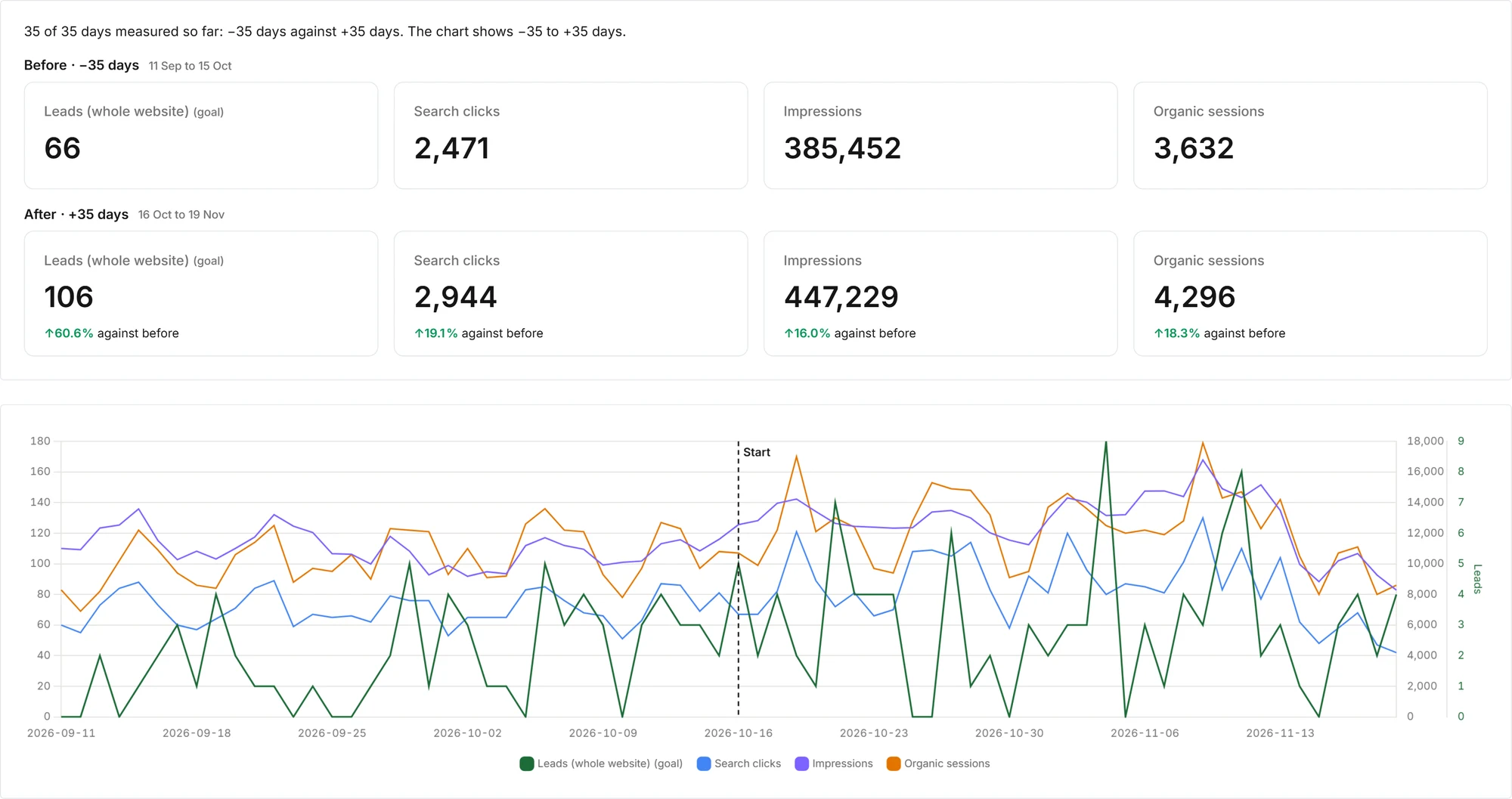
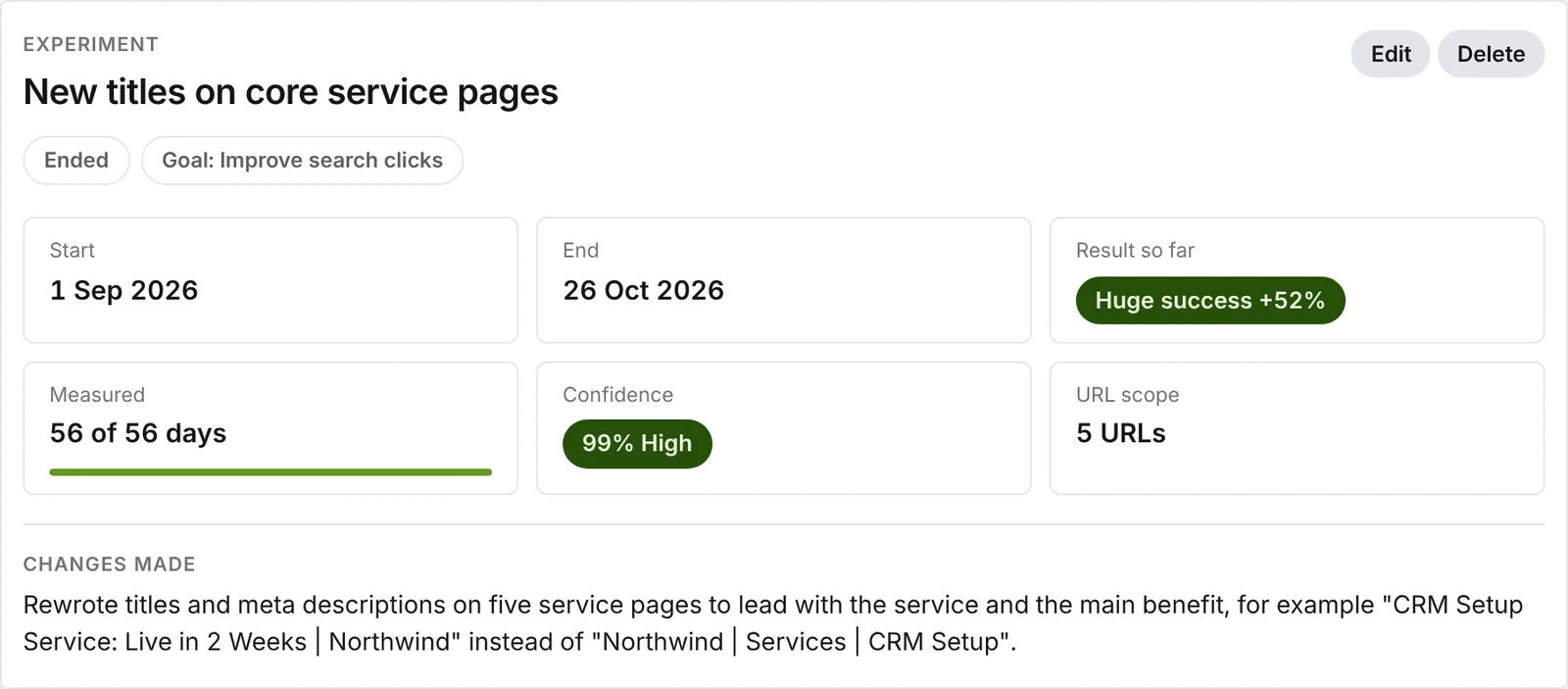
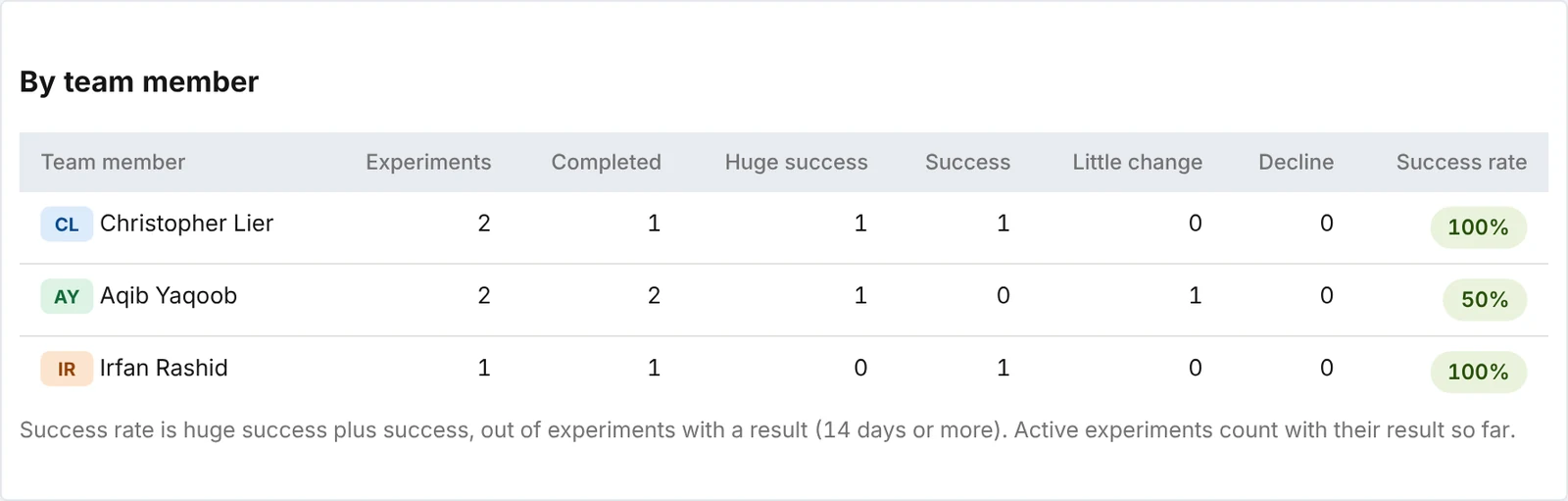
This post explains exactly how we do that in LinkPanda Insights, our own analytics software, and how you can apply the same method. The first screenshot below is a live experiment for one of our clients. The others use example data for an invented company, Northwind Software.
 Insights
Key Point: An SEO experiment compares the pages you changed against the rest of your website over the same days. That way a Google update, a seasonal dip or a site-wide traffic swing does not get mistaken for the result of your change.
Why Most SEO Changes Are Never Measured Properly
The usual way to judge an SEO change is to look at a traffic chart a few weeks later. If the line went up, the change worked. If it went down, it did not.
That method is wrong more often than people think, for three reasons:
- Seasonality: Many businesses see traffic rise and fall at the same time every year. A change made in early January can look like a success simply because January is busy.
- Site-wide movement: Google updates, new competitors and changes in demand lift or drop every page on a site at once. If all your pages rose 15%, a 15% rise on the page you changed tells you nothing.
- Noise: Daily search data jumps around. One good week after a change can be chance.
Without a fair comparison, teams keep changes that did nothing and drop changes that worked. Over a year, that adds up to a lot of wasted work.
What Is an SEO Experiment?
An SEO experiment is a planned change to one or more pages, measured against a fair baseline. You decide in advance what you are changing, which pages are affected and which number should improve.
There are two common ways to run one:
- Before and after on the same pages: You compare the days after the change with the same number of days before it. This is simple, but on its own it is exposed to seasonality and site-wide swings.
- Test pages against the rest of the site: You compare how the changed pages performed relative to the pages you did not touch. If the whole site rose 10% and your test pages rose 30%, the change gets credit for the difference.
Insights combines both. It shows the before and after change for the pages you picked, and it uses the rest of the website as the comparison when it works out how confident you can be in the result.
Why the rest of the site matters (example data)
The whole site grew 11% in the same weeks. The change only gets credit for the gap between the two bars, not for the full 52%.
The Goals You Can Test
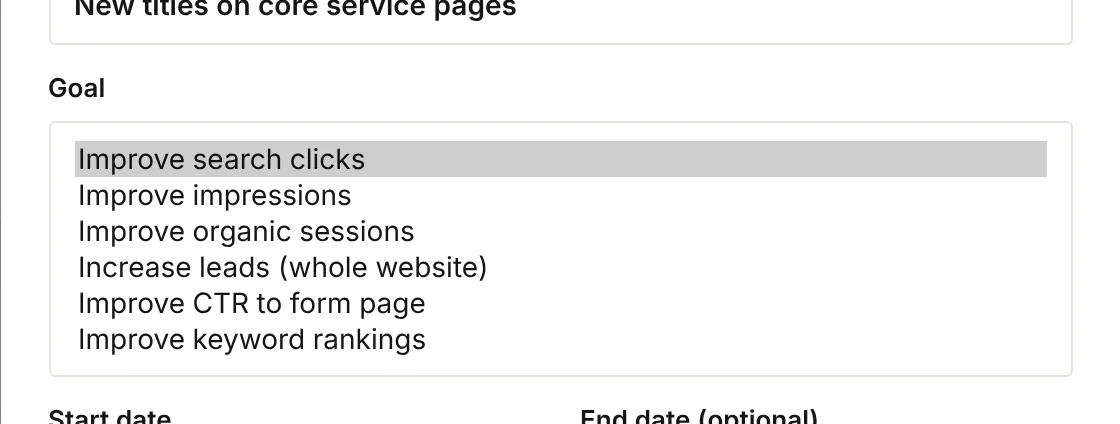
Every experiment in Insights has one goal. Choosing it up front stops you from picking whichever number looks best afterwards.
| Goal | What it measures | Good for |
|---|---|---|
| Search clicks | Clicks from Google Search Console to the chosen pages | Title, meta description and content changes |
| Impressions | How often the pages appear in Google results | New content, internal links, pages that get few clicks |
| Organic sessions | Visits from organic search in Google Analytics | Changes where you care about real visits |
| Leads | Enquiries for the whole website | Conversion and lead journey changes |
| CTR to form page | Share of visitors who go on to the enquiry form | Calls to action, page layout, trust signals |
| Keyword rankings | Daily Google position for up to 10 keywords | Targeted on-page work for specific terms |
How We Run an SEO Experiment, Step by Step
Every experiment at LinkPanda follows the same six steps.
1. Start With One Clear Question
A good experiment answers one question, such as “do shorter, benefit-led titles get more clicks on our service pages?”
If you change titles, content and internal links on the same pages on the same day, you will never know which change did the work.
2. Choose the Pages
Pick up to 10 pages that share the change, or leave the list empty to test the whole website. Pages with steady traffic give clearer results than pages with a handful of visits a month.
3. Pick the Goal Before You Look at Any Results
Choose the one number the change should improve. For a title test that is usually clicks. For new content or internal links it is often impressions, because rankings move before clicks do.
4. Log the Start Date and Exactly What Changed
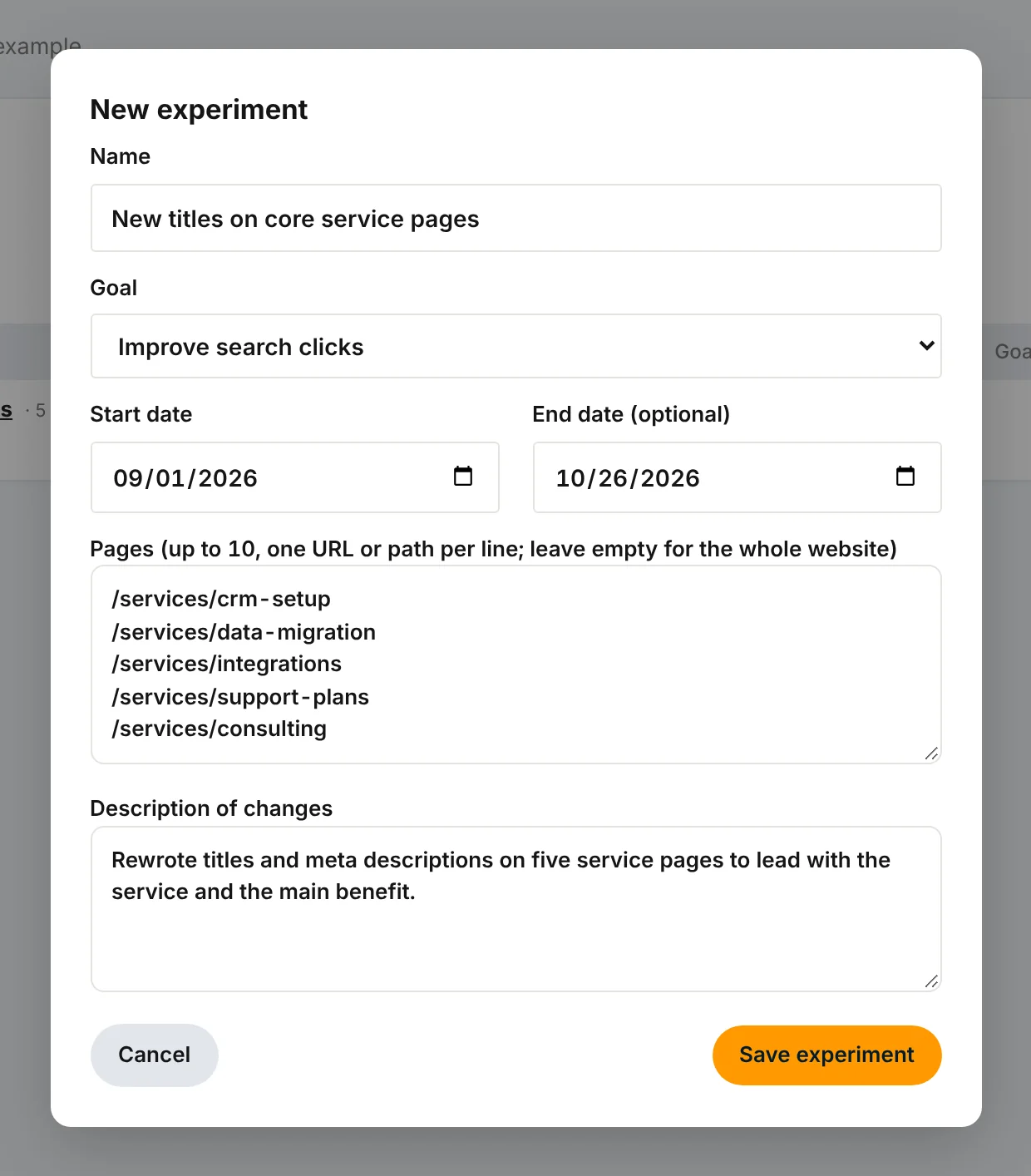
In Insights we create the experiment on the day the change goes live and write down exactly what changed: old and new titles, which links were added, which sections were rewritten. Months later, this record is what makes the result useful.
5. Leave It Alone
Once the experiment is running, we do not touch the test pages. Any further edit restarts the question.
6. Wait for Enough Data
Insights shows a first result from day 14 and a confidence score from day 21, once there are three full weeks before and after the change. For most experiments we let them run four to eight weeks.
Important: Two weeks of data can show a direction, not a conclusion. Daily search data is noisy, and a single strong week can make almost any change look good.
Choosing the Right Metric and Scope
Most failed experiments do not fail because the change was bad. They fail because the team measured the wrong number, or measured it on the wrong set of pages.
These two choices decide whether an experiment can give a clear answer at all, so we settle them before any change goes live.
Choosing the Metric: Measure What the Change Can Move First
Every change affects search results in a certain order. Rankings and impressions move first, clicks follow, and sessions and leads come last. We pick the metric that the change should move first and clearly, not the one we would most like to see go up.
| Type of change | Metric we use | Why |
|---|---|---|
| Titles and meta descriptions | Search clicks | The page already ranks, so a better title shows up as more clicks from the same impressions. |
| Internal links, new content, content rewrites | Impressions, then clicks | Google needs time to rank the page higher. Impressions rise weeks before clicks do. |
| On-page work for specific terms | Keyword rankings | A short list of keywords shows the movement directly, without traffic noise from other terms. |
| Page speed and technical fixes | Organic sessions | Fixes often help many queries a little, which shows best in total visits. |
| Calls to action, forms, trust signals | CTR to form page | The change affects what visitors do on the page, not how they find it. |
| Contact page and lead journey changes | Leads | Insights counts leads for the whole website, since a visitor can enter on any page. |
How we do it: we write down the expected first effect before choosing the goal. If we cannot say which number the change should move, the experiment is not ready.
Why it matters: an internal linking test judged on clicks after three weeks will often look like “little change”, because the pages have only started to climb in impressions. Judged on impressions, the same test shows the effect clearly.
Choosing the Scope: Pages, Groups, the Whole Site or Keywords
The scope is the set of pages, or keywords, the experiment measures. Too narrow and there is not enough data for a confident result. Too broad and the effect of the change gets diluted by pages it never touched.
| Scope | When we use it | How we set it up |
|---|---|---|
| One page | A high-traffic page with a clear, isolated change | Add the single URL. Only worth it with steady daily clicks. |
| A group of similar pages | The same change applied to pages of the same type, such as all service pages | Add up to 10 URLs that share the change and the page type. |
| The whole website | Site-wide changes, such as speed fixes, navigation, or lead journey work | Leave the pages list empty. The goal then covers the whole site. |
| Keywords | On-page work aimed at specific search terms | Choose the keyword ranking goal and add up to 10 keywords. |
How we do it: we group pages that received the same change and share a page type. We never mix a service page and a blog post in one experiment, because they gain traffic in different ways.
Why it matters: one blog post with 20 clicks a week cannot give a confident answer within two months. Five similar posts with the same change together give enough data to read the result in three or four weeks.
Important: Keep pages you did not change out of the scope, and keep pages you did change out of other running experiments. Overlapping experiments make both results impossible to read.
How Insights Reads the Result
This is the part most tools skip. Insights does three things to separate the effect of your change from everything else going on.
Before and After on Equal Periods
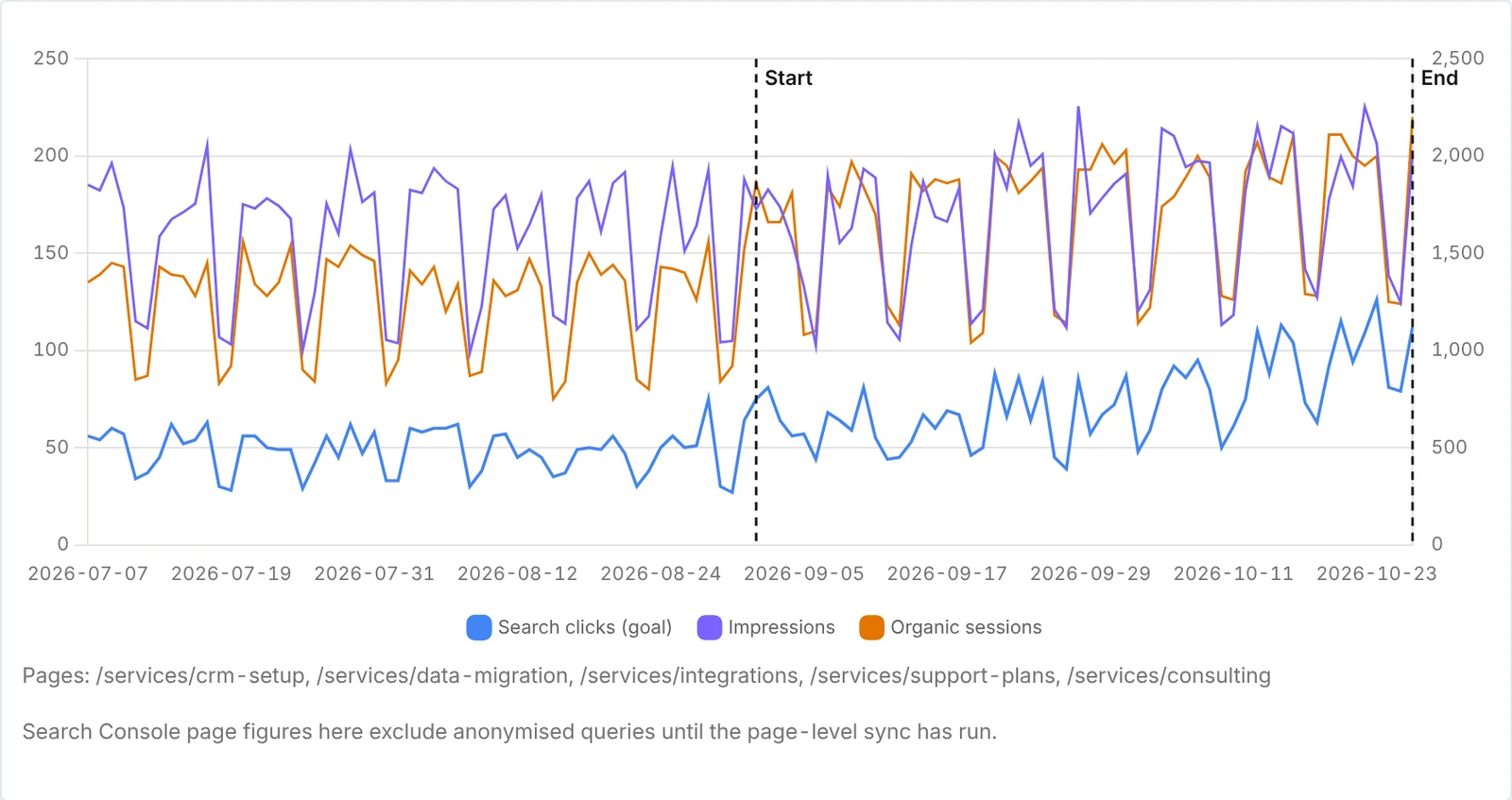
Insights compares the days since the change with the same number of days just before it, as daily averages. A 56-day experiment is compared with the 56 days before it, not with a random month last year.
The Rest of the Website as the Comparison
For page experiments, each day’s figure for the test pages is divided by the same figure for the rest of the website that day. Only pages that already had traffic before the start are counted, so a new page launched halfway through does not skew the comparison.
If a Google update lifts the whole site by 20%, it lifts both sides of that comparison, and it cancels out. What is left is how the test pages did relative to everything you did not change.
A Confidence Score You Can Trust
The confidence score answers one question: how likely is it that a difference this large happened by chance?
To work it out, Insights splits the period into whole weeks before and after the change. It then reshuffles which weeks count as “before” and which count as “after”, every possible way up to 8 weeks each side and 20,000 random ways beyond that.
If very few shuffles produce a difference as large as the real one, the result is unlikely to be chance. Shuffling whole weeks rather than single days matters, because search traffic has a weekly rhythm, with quieter weekends for most B2B sites.
Verdicts and Confidence Levels
| Result | Verdict |
|---|---|
| +50% or more | Huge success |
| +10% to +50% | Success |
| -10% to +10% | Little change |
| Below -10% | Decline |
| Confidence | Level |
|---|---|
| 90% or more | High |
| 75% to 89% | Good |
| 50% to 74% | Medium |
| Below 50% | Low |
We act on results with good or high confidence. A big percentage with low confidence usually means the experiment needs more time.
The SEO Experiments We Run Most Often
- Titles and meta descriptions: Rewriting titles on pages that rank but get few clicks. Goal: Clicks.
- Internal links: Adding links from related pages to a page we want to push. Goal: Impressions or rankings.
- Content rewrites: Rebuilding thin or dated pages. Goal: Impressions, then clicks.
- FAQs and schema: Adding question and answer sections with FAQ schema. Goal: Impressions and clicks.
- Calls to action: Changing buttons, forms and trust signals on service pages. Goal: CTR to form page or leads.
- Keyword targeting: On-page work aimed at a short list of terms. Goal: Keyword rankings.
Keyword Ranking Experiments
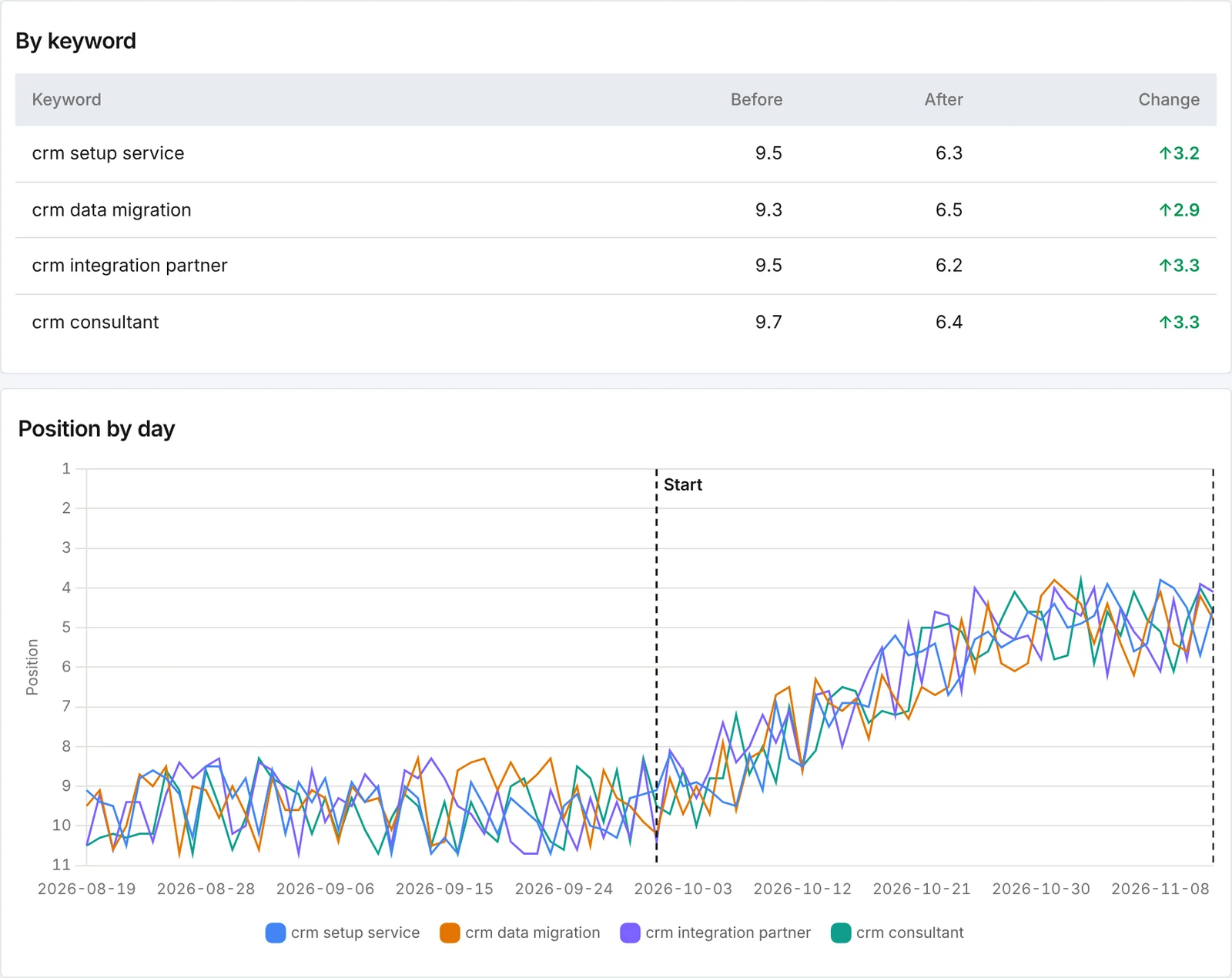
For ranking tests, you enter up to 10 keywords instead of pages. Insights tracks each keyword’s daily Google position from Search Console, weighted by impressions, and compares the average before and after the change.
A lower position number is better. In the example below, four service keywords moved from an average position of 9.5 to 6.4 after the headings and intro copy were rewritten.
A Worked Example
Example data, for illustration only.
Northwind Software has five service pages that rank on page one but get few clicks. The titles are long and start with the brand name. On 1 September, the team rewrites all five titles to lead with the service and the main benefit, and logs an experiment in Insights with the goal “search clicks”.
After 56 days, Insights shows:
| Measure | 56 days before | 56 days after |
|---|---|---|
| Clicks per day, test pages | 48 | 74 |
| Change | +52% | |
| Rest of the website | +11% | |
| Verdict | Huge success | |
| Confidence | 99%, High |
The whole site grew 11% in the same period, so not all of the 52% belongs to the new titles. But the test pages clearly outperformed the rest of the site, and the confidence score says that gap is very unlikely to be chance.
The team rolls the same title pattern out to the next 20 pages and logs that as a new experiment.
Seeing Every Experiment Across the Team
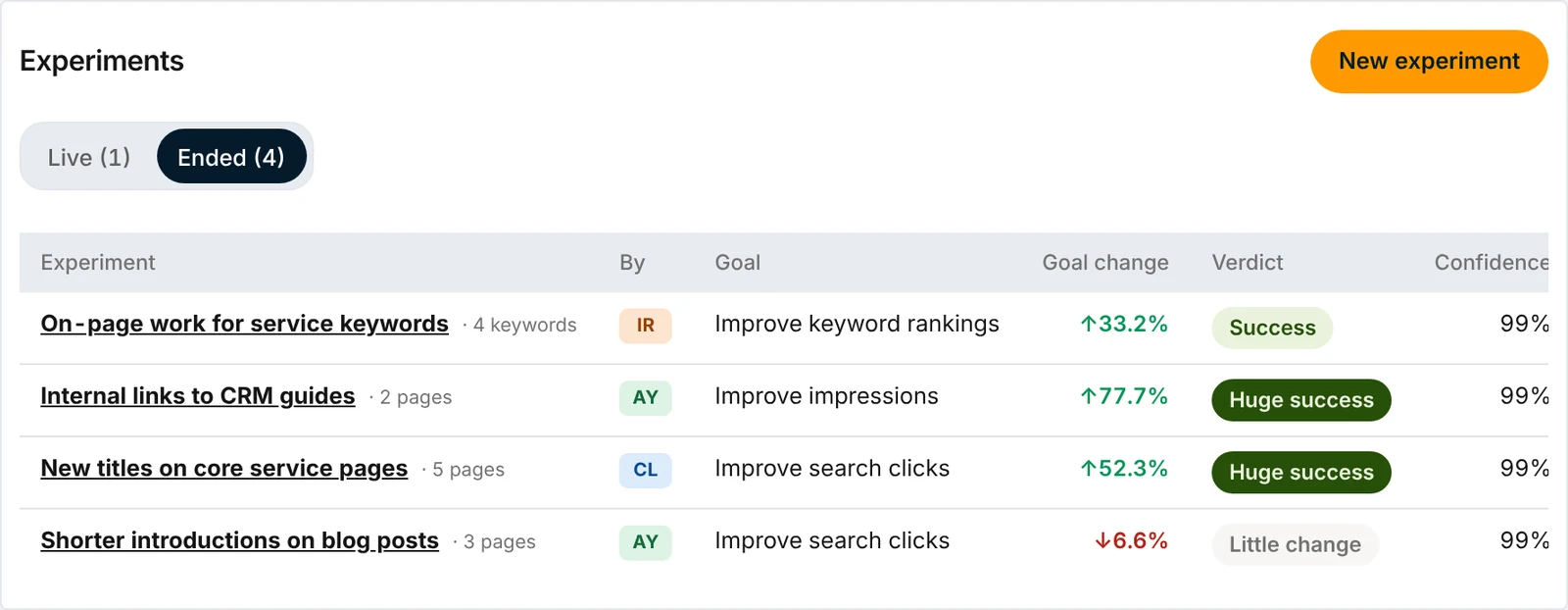
Insights also has a team-wide Experiments page. It lists every experiment across all clients, who ran it, its goal, the change so far, the verdict and the confidence.

Over time, this becomes our playbook. We can see which kinds of changes keep working, which do not, and which team members’ experiments perform best.
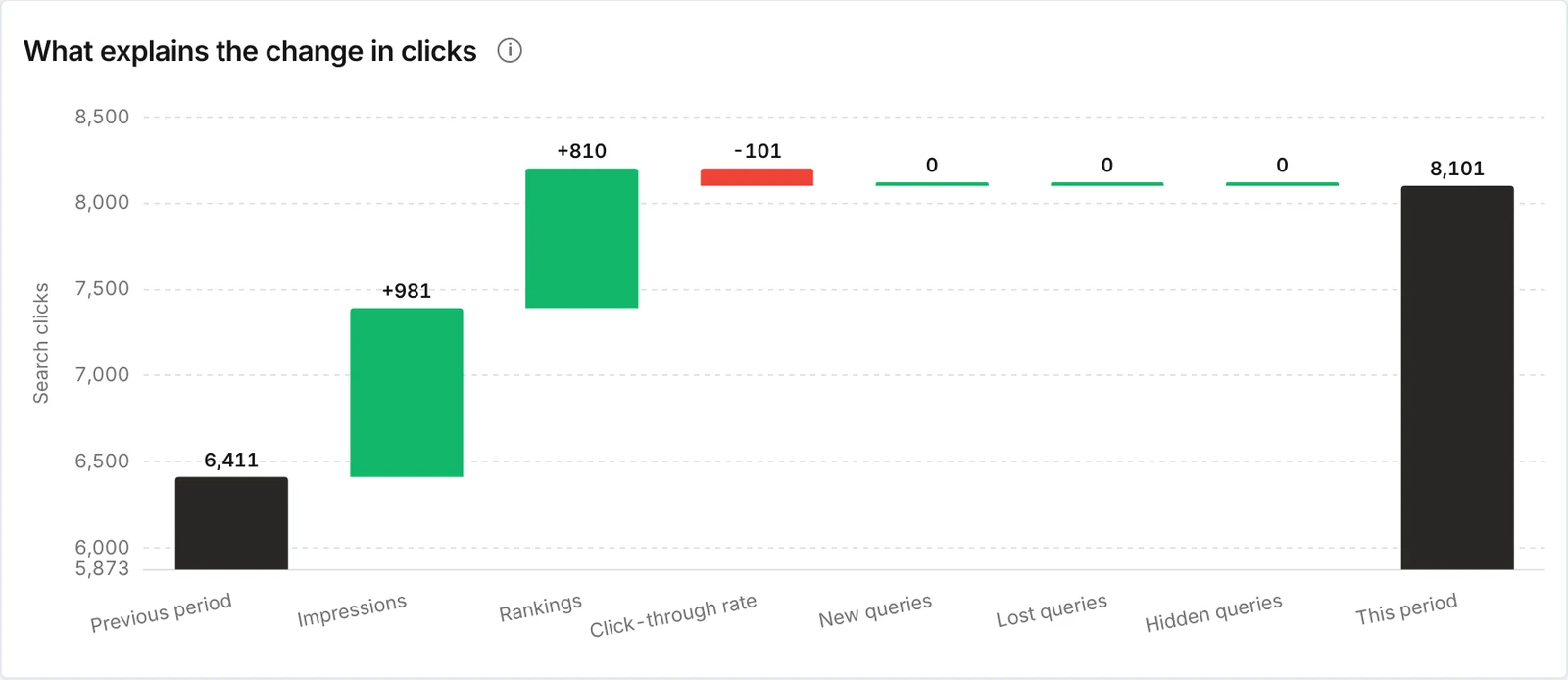
When something unexpected happens during an experiment, the “Why clicks changed” report shows what explains the overall change in clicks: impressions, rankings, click-through rate and new or lost queries, with the biggest gains and losses by query and page.
That helps us tell whether a jump came from the test pages or from somewhere else on the site.
Mistakes to Avoid
- Changing too much at once: Test one type of change per experiment.
- Ending too early: Wait for at least three full weeks, ideally four to eight.
- Picking the goal afterwards: Decide the goal before the change goes live.
- Testing pages with almost no traffic: A few clicks a week will not give a clear answer. Use impressions or group similar pages.
- Editing test pages mid-experiment: Any further change muddies the result.
- Ignoring declines: A change that hurt performance is a valuable result. Roll it back and record why.
How This Fits Into Our SEO Work
Experiments are part of every LinkPanda SEO campaign. Our SEO team logs each month’s important changes as experiments in Insights, so we know what worked before we roll it out further.

It means our recommendations are based on what has worked on your site, not on general advice. Clients see the outcome in their SEO reporting: the traffic, rankings and leads the work produced.
If you want an SEO partner that measures its own work this way, see our SEO services or start with an SEO audit.
Frequently Asked Questions
LinkPanda Link Building: Frequently Asked Questions
About The Author

Christopher Lier
Christopher is an experienced Search Engine Optimization (SEO) marketer and digital marketing specialist. He is Co-Founder of LinkPanda and leads the marketing and sales teams. Mostly known as a Software-as-a-Service co-founder of LeadGen App, he has helped grow the website to become a renowned player in the lead generation space with steadily growing user base and readership.
You May Also Like
Best Email Marketing Platforms for Small Businesses
Best Customer Support Software for Startups
Best Time Tracking Software for Agencies and Small Teams
Best Cold Email Software Tools for B2B Outreach
Best AI Content Detectors for Businesses

Brand Mentions for SEO: How to Earn More for AI Search
Link Reclamation: How to Find and Recover Lost Backlinks

23 Best Tech Startups in Finland: The Nordic’s Startup Hall of Fame
Best Enterprise SEO Agency Picks for 2026
Best AI SEO Tools for 2026 (Reviewed and Compared)
Best Link Building Tools for 2026 (Reviewed and Compared)
Top SEO Companies & Agencies in the USA